Numoo link in bio: bookings and your business links
Your Numoo booking page can also be your business link in bio. Add Instagram, Facebook, TikTok, Snapchat, your website and up to three named links, then share your existing Numoo address. Customers can book a service or explore your business from the same starting page. For owners in Libya who use Linktree mainly to collect these links, this can bring bookings and those destinations together. You copy the links across yourself; there is no automatic import.
Before you start
- Keep booking and your important business links on one page.
- Add four supported social profiles, one website and up to three custom links.
- Check every destination on your phone before changing your bio.
A booking link should leave room for the rest of your business
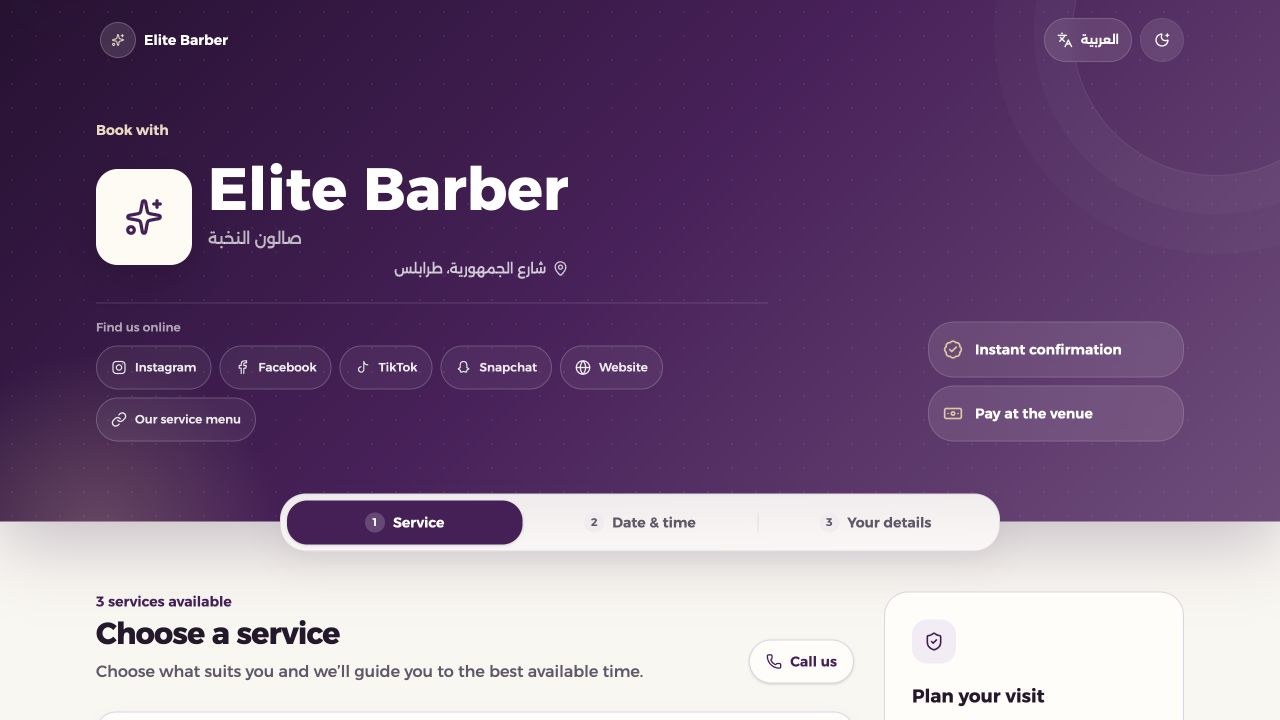
A customer looking at your Instagram profile may want an appointment, but they may also want to see your work, browse products or check your other location. A single booking address is more useful when it gives them access to those things too. Numoo now places your optional business links below your introduction on the customer booking page.
The page still leads into choosing a service and an available time. The new links give visitors other useful destinations without replacing that booking flow. They open in a new tab, so customers can return to the booking page. This guide is for salon owners, trainers, clinics and other appointment businesses that want a practical booking link in bio in Libya.
What you can add to your Numoo page
Use the dedicated fields for Instagram, Facebook, TikTok and Snapchat, plus the website field. You can also add up to three custom links. Give each one a short name that tells people what they will find. A public product catalogue, a service menu or the booking page for your second location are useful examples.
Custom links support Arabic and English labels. Add both if you serve customers in both languages; at least one label is required. Each label can be up to 50 characters. You do not need to fill every slot. An accurate, useful destination matters more than a row of icons for accounts you no longer use.
| Link type | Available space | Example use |
|---|---|---|
| Social profiles | Instagram, Facebook, TikTok and Snapchat | Show your work and updates |
| Website | One website link | Your main business website |
| Custom links | Up to three named links | A shop, menu or another location |
Set it up in the business dashboard
Sign in with an owner account or a manager account that can manage business settings. Open Settings and find “Find you beyond the booking”. This is the same section called “روابط نشاطك” in Arabic. Keep your existing booking address: adding links does not require creating a new business or changing the URL customers already know.
- Paste the full public HTTPS address into each relevant social or website field. Use the matching platform: an Instagram profile goes in Instagram.
- For another destination, use one of the three custom links. Enter its URL and a clear Arabic label, English label or both.
- Choose “Save links”. This section has its own save button.
- Open “View your booking page”. Check the links below the business introduction, switch languages and test the destinations on your phone.
Moving from Linktree without leaving useful links behind
First, make a list of the destinations on your current Linktree page. Copy the actual destination URLs, such as your Instagram profile or public shop page, into the matching Numoo fields. Moving the destinations manually lets you check which links are still relevant before you change the address in your bio.
If you have more than three custom destinations, you can keep your Linktree page and add it as one of your Numoo custom links, with a label such as “More useful links”. That leaves a route to the rest of your content. You can also keep Linktree as your main bio page and add Numoo there as the booking destination. Choose the route that fits what your customers come to do.
Linktree is a broader link-in-bio product with its own audience and link analytics tools. This Numoo feature is not a promise to reproduce all of those tools. If your business depends on them, keep them in place. For a business mainly sharing the supported social accounts, a website and a few useful links, the Numoo page may cover the everyday need alongside booking.
Put the right Numoo address in your bio
Copy the public booking link from your business dashboard. It will use your own business address on numoo.ly. Avoid copying the dashboard URL or a private link used to manage an individual appointment. Add the public address to the website or links area of your social profile, and give it a label such as “Book & explore” where the platform supports a label.
Try this short English bio line: “Book your appointment. Find our services and social pages below.” Adapt it to your business rather than leaving a generic placeholder. Open the profile as a visitor after saving it and follow the whole route: bio, Numoo page, business link, then back to the booking choices.
Keep the page useful after launch
If a destination changes, update its URL in Settings and save the links again. To remove a link, clear its URL and save. Check the page whenever you rename a social account, move your shop or open a new location. Keep the service names, prices and availability accurate too: the links introduce the business, but the booking page still needs to explain what someone is reserving.
Start by checking whether customers can find what they need and whether your team receives fewer repeated requests for the same links. Use booking records to review actual reservations. The profile-links feature does not include per-link click analytics, and a reservation is not proof of attendance or collected revenue. Keep those distinctions clear when reviewing results.
Your next step is small: copy your important destinations into Numoo, save, and test the public page. Once the links work, put your existing Numoo address in your bio. Keep your old link page available until you are comfortable that the new route covers your business needs.
Common questions
Can Numoo replace Linktree for my business?
It can cover a simple bio page built around bookings, the four supported social profiles, one website and up to three custom links. If you need more destinations or depend on other Linktree tools, keep Linktree and link to it from Numoo, or add your Numoo booking link to Linktree.
Will my Linktree links transfer automatically?
No. Copy the destination URLs into Numoo Settings and save them. Test each link before replacing your bio address. Your existing Linktree page is not changed or deleted by saving links in Numoo.
Do customers need a Numoo app to use the page?
No. They open the booking page in their browser. The optional social and website links open in a new tab; the customer can return to choose a service and continue the booking flow.
Can I see how many people clicked each business link?
The profile-links feature does not currently provide per-link click counts. Review bookings through your existing business records and use any metrics provided by your social platform separately.
Put it into practice
This guide describes current product behaviour. Worked examples are illustrative, not customer results or performance guarantees.
Open the illustrated steps in the product guideMake the next step a practical one.
Set up one service and a clear schedule, then start with your business link.
Start your business page