
Booking analytics and customer records: five numbers a business owner can use
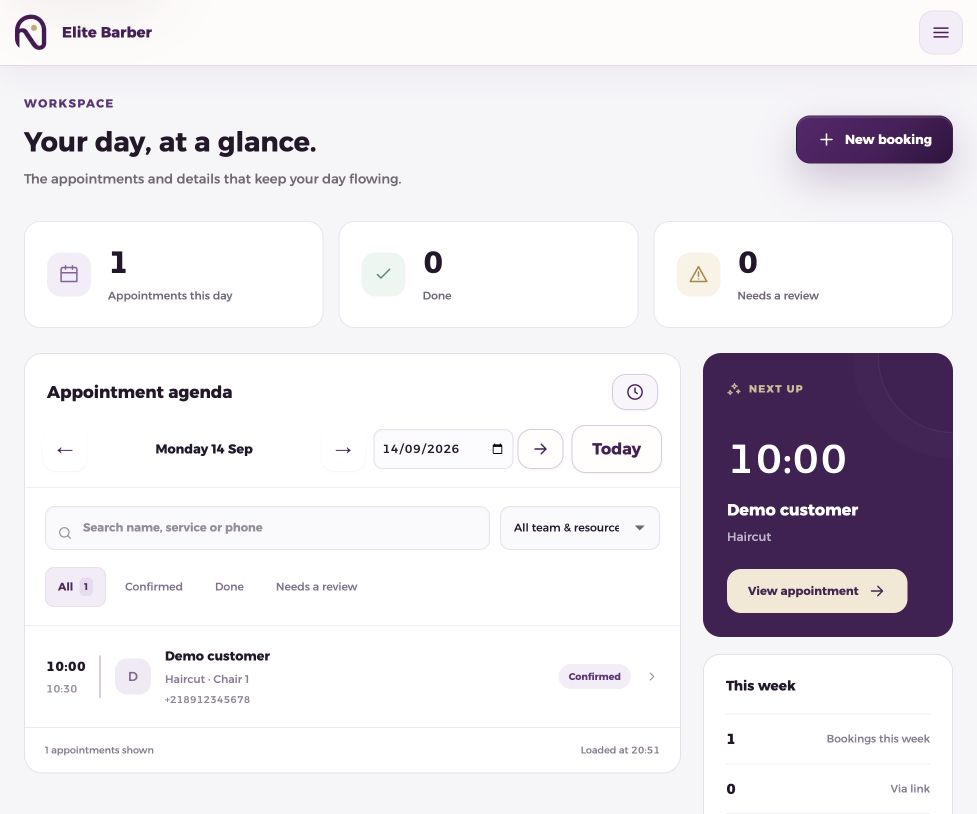
Booking analytics turns appointment records into decisions about time, demand and customer experience. Numoo stores customer contact and booking records and shows weekly booking figures on the business board. Those operational records are different from website analytics, and booking value is different from money collected.
Before you start
- Label each metric and its date range before comparing results.
- Keep completed and no-show statuses accurate.
- Customer contact details help serve customers; they do not belong in public-site analytics.
Start with records the team can trust
The customer directory lets an authorized team member find customers by name or phone number. Booking history, visit counts and no-show counts can help reception understand earlier visits. These records only become reliable when the team records phone bookings and updates outcomes consistently.
Use the contact information for a clear purpose, explain that purpose and limit staff access. Do not treat a booking number as automatic consent to promotional messages. Avoid recording unrelated sensitive information in ordinary appointment fields.
Five measures, with clear definitions
The Today board reports weekly bookings, bookings made through the public page, no-shows and saved booking value. Its week runs Saturday through Friday. A comparison is useful only when both periods use the same rules and their statuses are sufficiently complete.
Some useful ratios below are calculations you perform from the records, not separate dashboards already provided by the product. In particular, do not mistake a total history count for a period-specific retention report.
| Measure | Definition | Interpretation |
|---|---|---|
| Weekly bookings | Confirmed, completed and no-show bookings in the displayed week | Work scheduled; cancelled bookings and temporary holds are excluded |
| Online-booking share | Public-page bookings ÷ the same weekly booking count | How much booking activity uses the link |
| Outcome-based no-show rate | No-shows ÷ (completed visits + no-shows) | Use finished appointments, not future reservations |
| Booking value | Saved service amounts plus add-on amounts | Scheduled value, not cash collected or profit |
| Returning-customer review | Customers with earlier completed visits | Review history; do not assume a ready-made retention cohort report |
Work through a small example before comparing weeks
Illustrative figures, not customer results: suppose a week contains 40 bookings, of which 25 came through the public page. The online-booking share is 25 ÷ 40 × 100 = 62.5%. That tells you about booking source, not website conversion, because it does not include all website visitors.
Suppose 27 visits were completed and three were no-shows, with the remaining appointments still ahead. The outcome-based no-show rate is 3 ÷ 30 × 100 = 10%. Dividing by all 40 would mix finished and unfinished appointments.
If 40 saved service amounts were each 50 LYD with no extras or discounts, their booking value would be 2,000 LYD. Actual collections could differ because of attendance, refunds or payment timing. Do not label 2,000 LYD as collected revenue without a payment record.
Choose one change that the data can test
If online-booking share is low, first check whether the link is easy to find and whether service descriptions are understandable. If a particular time repeatedly creates missed appointments, review the messages and the business’s arrival or cancellation expectations.
Compare like with like: a holiday week and an ordinary week can have different opening hours and demand. Write down the change and the dates. A small sample or several changes at once makes it difficult to attribute the result to one cause.
- Close out the previous week’s booking statuses.
- Write down the same date range and definitions each week.
- Review customer history only where it supports a service decision.
- Choose one practical change, such as a clearer service name or booking link.
- Review the next comparable period and record what changed.
Keep website analytics separate from customer records
Google Analytics can show which public pages attract consenting visitors and which pages lead to a signup-button click. A click is not a completed signup, a booking or a sale. Search Console adds search impressions and queries; neither tool replaces the business booking records.
For the public Numoo site, optional marketing measurement uses public-page information and limited events. Customer names, phone numbers, booking-management tokens and private dashboard activity are outside this tracker. Read the analytics notice for the exact scope and consent controls.
Common questions
Is booking value the same as revenue?
No. It is the value saved on the booking, including applicable service pricing and add-ons. Actual money collected requires a payment or reconciliation record.
Can I see customer names and phone numbers?
Authorized users can use the customer directory and booking records for their business. These details should remain in the operational workflow, not be sent to marketing analytics.
Does a signup click prove that a new business registered?
No. The event only records a click toward signup. Completed registration and actual bookings need their own verified operational evidence.
Put it into practice
This guide describes current product behaviour. Worked examples are illustrative, not customer results or performance guarantees.
Open the illustrated steps in the product guideMake the next step a practical one.
Set up one service and a clear schedule, then start with your business link.
Start your business page