
Salon booking software in Libya: organise services, staff and returning clients
A useful salon booking system connects each service to the staff available to deliver it. Numoo lets owners organise services, calendars and customer records, while clients choose an available appointment from a shareable page. The first job is to make the online schedule match the way the salon actually works.
Before you start
- Use the real duration of each service rather than one length for everything.
- Record desk bookings and staff breaks in the shared schedule.
- Judge offers using booking value and costs, not booking count alone.
Build the service menu around time and clarity
A short menu is easier to book than a list of vague names. Explain what the customer is choosing and set a duration that includes the work you need to reserve. A consultation, a cut and a colour appointment should not all occupy the same length of time.
Example only: a barber might reserve 30 minutes for a haircut and 15 minutes for a beard trim. A salon might reserve 60 minutes for a cut and style and 120 minutes for colour. These are setup examples, not universal service standards; replace them with timings from your own team.
| Illustrative service | Reserved time | Before publishing |
|---|---|---|
| Haircut | 30 minutes | Check the actual average duration |
| Cut and style | 60 minutes | Clarify what the service includes |
| Colour | 120 minutes | Allow for the work your team must reserve |
Give every bookable staff member a real calendar
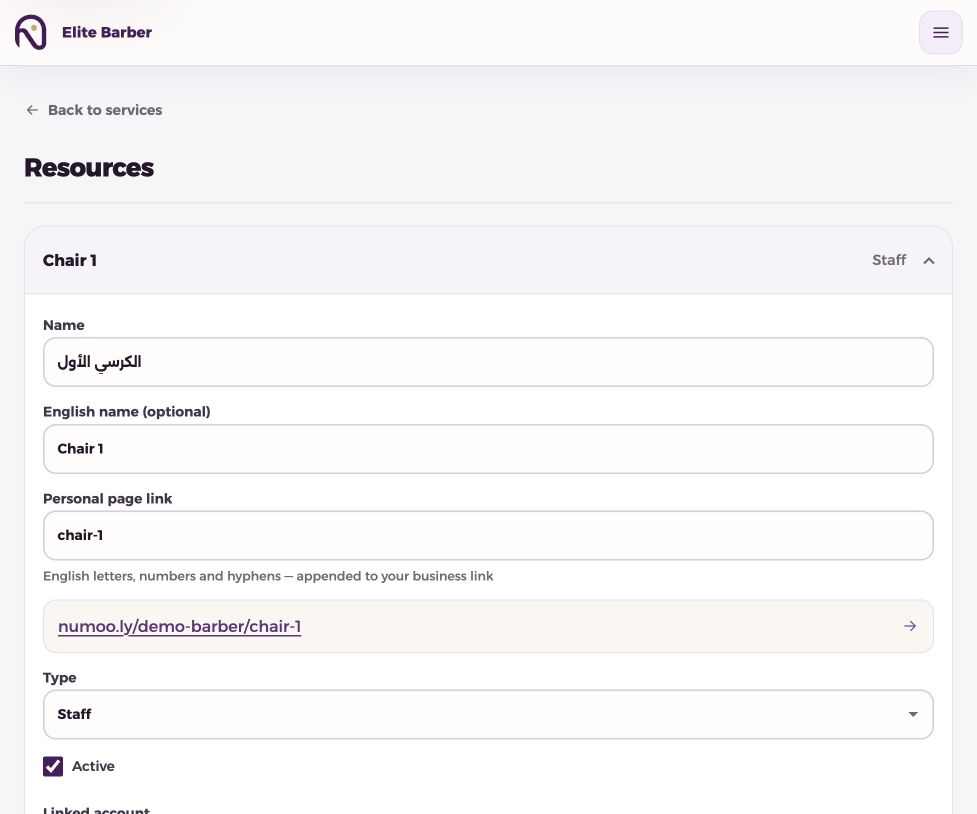
Customers should only see a stylist who is available for the service. Set each relevant calendar’s hours and closures, then link services to the appropriate staff. A break, holiday or late start belongs in the calendar before someone books.
A chair and a staff member are not always interchangeable. If one person moves between chairs, creating two independent calendars can overstate capacity. Model the actual limiting resource and review the setup with the person who runs reception.
- Create the staff/resource calendars you can genuinely serve.
- Assign the relevant services and hours.
- Record an existing phone booking before sharing the link.
- Test a booking from a customer’s phone-sized view.
- Check the Today board together before the next shift.
Use client records to improve the next visit
Reception can search saved customers by name or mobile number and review booking history. Completion and no-show counts become useful when the team keeps statuses accurate. A corrected status should represent what actually happened, not a judgment about the customer.
Explain why you need contact information: to identify and manage the appointment and send booking messages. Keep access limited to the people who need it. Ask separately before using a booking phone number for promotional contact.
Make a service discount understandable
An owner can select services and set a percentage or fixed discount, with an optional booking window. The best eligible service offer applies automatically. Discounts do not stack, add-ons retain their own prices and existing booking price snapshots are preserved.
Example only: a 50 LYD service with a 10% offer becomes 45 LYD. If the customer chooses a 10 LYD add-on, the combined amount is 55 LYD. The extra is not reduced by the service discount. Check the preview before activating the offer.
A scheduled booking window controls when the offer can be used to make a booking. Do not advertise it as a day-of-week or appointment-time restriction unless you have explicitly implemented that rule. More discounted appointments are not automatically more profit; compare costs and the value of the work.
Use the week’s numbers for one concrete decision
Look at bookings, public-link bookings, no-shows and booking value. If one service often overruns, review its duration. If customers repeatedly ask the same question, improve its description. If an offer fills time but reduces the value of already busy hours, reconsider the offer.
Booking value is based on the saved service and add-on amounts. It is not a bank settlement or a cash-total report. Reconcile actual collections separately, and use the customer-data guide to keep those measures distinct.
Common questions
Can customers choose a stylist?
The booking page can offer eligible staff/resource choices according to the service setup and availability.
Do discounts change old bookings?
An existing booking retains its saved price snapshot. Check the offer preview for the price a new eligible booking would receive.
Does this replace stock control or payroll?
These guides cover booking, schedules and customer records. Do not assume inventory, payroll or full accounting functions are included.
Put it into practice
This guide describes current product behaviour. Worked examples are illustrative, not customer results or performance guarantees.
Open the illustrated steps in the product guideMake the next step a practical one.
Set up one service and a clear schedule, then start with your business link.
Start your business page