
Fitness class booking: manage studio places without a crowded group chat
A class-booking system manages places within a scheduled session. In Numoo, a studio can set a class capacity and offer available places through its booking page. A private session uses appointment rules instead, while renting the whole studio uses rental rules. Choose the model that matches what the customer buys.
Before you start
- A place in a group class is different from an exclusive room booking.
- Capacity should reflect the real space, equipment and instructor availability.
- Keep attendance accurate before using booking history to plan the next week.
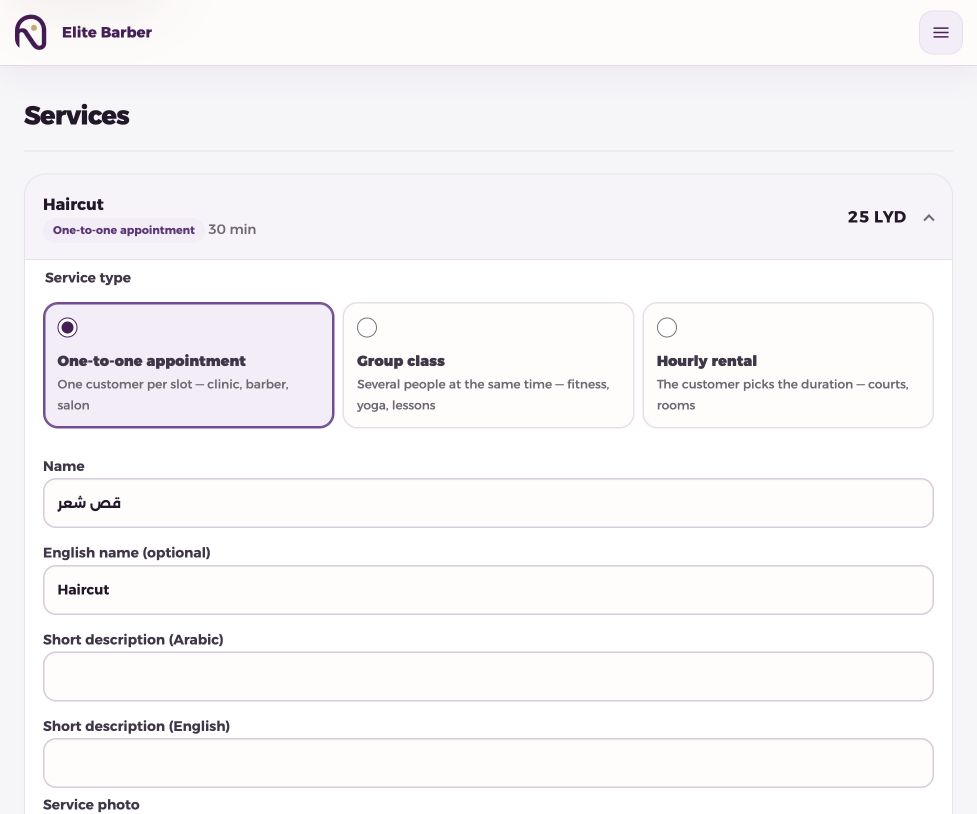
Choose between a class, a private appointment and a rental
When six customers attend the same session, they share its start time and its capacity. When a customer books a one-to-one session, the relevant instructor or room needs an exclusive appointment. When somebody rents the studio, they reserve the resource for a selected duration.
Do not create eight independent appointment calendars merely to represent eight class places. That makes the schedule difficult to maintain and can give the team a misleading view of availability. Use a class with the appropriate seat capacity.
| What the customer books | Suitable booking model | Main limit |
|---|---|---|
| One place in a group session | Class | Places in the session |
| A private coaching session | Appointment | Instructor/resource availability |
| The whole room for a period | Rental | Room availability and duration |
Set capacity from the room you actually have
Example only: a studio with eight usable places offers a class capacity of eight. Six confirmed places leave two available places. If equipment maintenance makes two places unusable, review the capacity before accepting more bookings.
Your team must also plan the instructor and room consistently. A class system does not know about a session that is only written in somebody’s notebook. Record the work and review any shared resource across services.
- Create the class service with a clear name and duration.
- Set the session capacity to the places you can deliver.
- Configure the schedule and relevant room/resource.
- Check the customer view for time, price and availability.
- Record reception bookings and update attendance after the session.
Make the description answer the usual questions
Explain what is being booked: one place, one private session or use of the entire room. State the location and any practical arrival information. Clear descriptions reduce avoidable questions, but they should not promise a particular fitness result.
A customer can open the booking link from a social profile or a message, choose an available option and receive an SMS confirmation. The team can keep its group chat for announcements while using the booking page as the schedule of record.
Mark attendance and interpret repeat visits carefully
After a session, mark completed visits and no-shows according to what happened. This makes the customer’s history more reliable and helps the next receptionist understand an earlier booking.
A customer appearing in the directory is not proof of an active membership, a recurring payment or a paid package. Do not use a booking record as an automatic access-control decision. The current workflow is appointment and capacity management, not a complete membership-billing system.
Review demand before adding another class
For a simple weekly review, compare booked places with offered places at each time. Example only: six reserved places out of eight is 75% reserved capacity. Attendance can be lower, so review the final statuses as well as the initial reservations.
This is a worked calculation, not a claim of a built-in class-occupancy dashboard. The business board provides booking figures and booking value; the team can use the schedule to compare sessions. If the same time repeatedly fills while another stays quiet, test one schedule change and compare equivalent weeks.
Common questions
Does a class allow several customers at the same time?
Yes, up to the configured session capacity. An appointment or exclusive rental follows different availability rules.
Can a studio offer private sessions too?
Use an appointment service for a private session and link it to the resources that must be available.
Does a booking mean a gym membership is paid?
No. Booking records and attendance do not establish payment or membership entitlement. Maintain those records separately where needed.
Put it into practice
This guide describes current product behaviour. Worked examples are illustrative, not customer results or performance guarantees.
Open the illustrated steps in the product guideMake the next step a practical one.
Set up one service and a clear schedule, then start with your business link.
Start your business page