
Service discounts: protect margin before chasing bookings
A service discount is useful when it has a clear commercial purpose and the numbers still work. More reservations alone do not prove an offer succeeded. In Numoo, an owner can apply a percentage or fixed reduction to selected services automatically. Before launching one, calculate the contribution per completed visit, define the booking window and decide how you will judge the result.
Before you start
- Choose a reason for the offer before choosing a percentage.
- Numoo’s offer window applies when the booking is made, not the appointment date.
- Compare contribution and completed visits, not just discounted booking volume.
Give the promotion one specific job
An offer might introduce a new service, encourage people to try a quieter service or test demand among an existing audience. Write that purpose in one sentence. “Increase bookings” is too broad to help you decide whether a lower price was worth it. State which service, which period and which behaviour you want to change.
Do not label a standard booking-window offer as “weekday appointments only” unless the eligibility actually enforces that restriction. Numoo currently selects services and the time during which a booking is made. It does not turn a promotion into an appointment-day filter. Make the public wording match the rule customers will encounter.
Know what the Discounts tab changes
Choose the eligible services, set a percentage or fixed amount, and define the active period where needed. Customers do not enter a promo code: an applicable offer appears automatically. The service’s catalogue price remains available as the original price; the offer determines the current eligible quote.
When offers overlap, Numoo uses the best eligible service price rather than stacking discounts. Existing confirmed bookings retain their saved price, and moving a booking does not reprice it just because an offer changed. Extras remain separately priced; do not imply that a service discount necessarily discounts the entire basket. Preview a realistic booking with its extras before advertising the total.
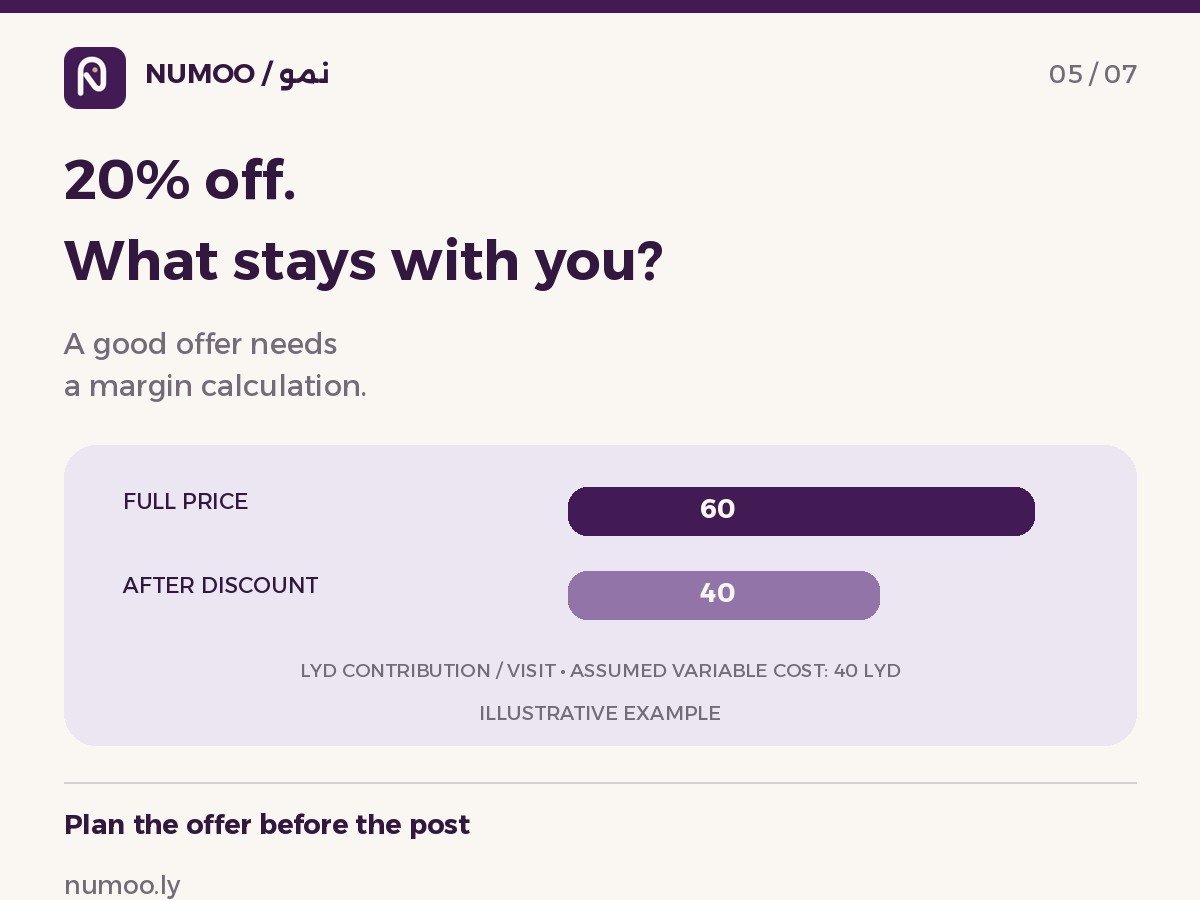
A 20% discount can require far more than 20% extra visits
Here is an illustrative contribution calculation, not a pricing recommendation. A service priced at 100 LYD with an assumed variable cost of 40 LYD contributes 60 LYD before fixed costs. A 20% discount reduces the price to 80 LYD and the contribution to 40 LYD, if that variable cost stays the same.
Ten full-price completed visits contribute 600 LYD. It would take 15 discounted completed visits to contribute the same 600 LYD: 50% more visits. This example ignores taxes, fixed costs, capacity constraints and changes in customer mix. Replace the assumptions with your own figures. If you cannot deliver the extra appointments, increased demand may not repair the margin loss.
| Illustrative calculation | Full price | 20% discount |
|---|---|---|
| Price | 100 LYD | 80 LYD |
| Assumed variable cost | 40 LYD | 40 LYD |
| Contribution per completed visit | 60 LYD | 40 LYD |
| Visits for 600 LYD contribution | 10 | 15 |
Test extras and clear choices as another option
An optional extra can give a customer a useful choice without reducing every service price. Describe exactly what the extra includes, its price and any effect on the appointment. Avoid adding things by default that a customer did not select. The goal is a clearer offer, not a surprise at checkout.
Compare the operating effort too. A discounted service with a complicated explanation may create more questions for reception. An extra that adds time may affect what can fit into the day. Before launching either, ask the person delivering the service to review the setup and complete a demonstration booking with the team.
Decide the stop rule before you publish
Write down the minimum contribution you need, the maximum number of discounted visits you can fulfil and the point at which you will review the offer. Do not invent a scarcity claim such as “only three left” unless it reflects genuine capacity. If the offer has an end date, make that date visible in the customer message.
Count completed discounted visits separately from cancellations and no-shows. Compare a suitable baseline, and note any advertising spend. Some discounted customers might have booked at full price anyway; a higher booking count alone cannot tell you how much demand was genuinely added. Use a small trial to learn before broadening the offer.
Close the loop after the offer ends
Review the service’s completed visits, realised price, variable costs and customer questions. Look at whether first-time customers later return, but avoid calling a single repeat visit proof of long-term loyalty. Keep the observation window clear so your partner can tell what was measured.
If the offer did not produce useful contribution or a valuable learning result, stop or redesign it. If it worked, document the conditions under which it worked rather than repeating it everywhere. Numoo makes selected-service offers easier to apply; the owner still decides whether the economics justify them.
Common questions
Does a Numoo discount change existing bookings?
Existing confirmed bookings keep their saved price. An offer affects eligible new quotes during its active booking window. A later change to an offer does not rewrite the price already saved on a confirmed reservation.
Can I restrict an offer to appointments on a weekday?
The current discount window concerns when the booking is made, not which day the appointment takes place. It is not an appointment-weekday eligibility rule. Do not advertise that restriction unless you have a separate setup that genuinely enforces it.
Can a customer stack discounts or use a promo code?
Current Numoo service offers apply automatically without a code. If more than one eligible offer exists, the best service price is used rather than stacking reductions. Review extras separately when checking the final booking total.
Put it into practice
This guide describes current product behaviour. Worked examples are illustrative, not customer results or performance guarantees.
Open the illustrated steps in the product guideMake the next step a practical one.
Set up one service and a clear schedule, then start with your business link.
Start your business page